US vs Canada hiring cost calculator
Estimate what an employee costs an employer in a US state or a Canadian province: salary plus employer payroll taxes, the full cash outlay and the on-cost percent. Compare two locations side by side.
Showing an example: a US$100,000 salary in Texas compared with a CA$100,000 salary in Ontario. Both figures are estimates of employer payroll taxes, not the full cost of hiring.
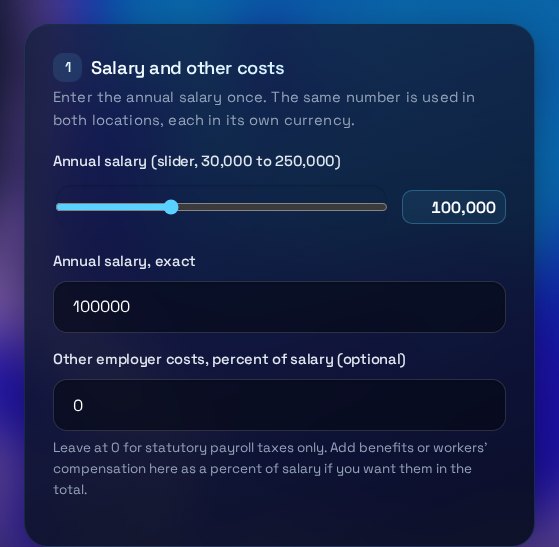
Salary and other costs
Enter the annual salary once. The same number is used in both locations, each in its own currency.
Location A
Location B (for comparison)
Not included: workers' compensation, benefits (unless you add them above), FUTA credit reductions, and provincial payroll tax above the exemption threshold. See the full list in step 5.
Cost breakdown, side by side
Each column is in its own currency. Employer on-cost is the amount above salary, as a percent of salary.
What this tool does not include
- Workers' compensation: WSIB (Ontario), WorkSafeBC (British Columbia), WCB (Alberta) and US state workers' compensation insurance. Add them under other employer costs if you need them.
- Health, dental and other benefits unless you enter them under other employer costs, plus paid leave, bonuses, equipment, office and recruiting costs.
- The FUTA credit reduction that applies to some states with federal unemployment loans (California is one). The FUTA line shows the standard 0.6 percent only.
- Provincial payroll tax at larger payroll totals (for example Ontario's employer health tax above its exemption), US state income tax withholding, and local taxes.
- Currency conversion. US locations are in US dollars and Canadian locations are in Canadian dollars.
Rates used (2025)
These are estimates based on 2025 rates. Rates change every year, so confirm them with the CRA (Canada), the IRS (US federal) and your state unemployment agency before you budget. This is not tax advice.
How to use the US vs Canada Hiring Cost Calculator
Use the sections below to set the salary and the two locations, then read the breakdown. The page also lists what the estimate leaves out, so you know what to add yourself.
What each input means
The annual salary is the gross pay for one employee, entered once and used for both locations, each in its own currency. Other employer costs is an optional percentage of salary for items the statutory lines do not cover, such as benefits or workers' compensation. For each US state you enter the new-employer unemployment rate and the wage base, which is the earnings level the rate applies to. Canadian provinces need no extra inputs at these payroll sizes.
How to read the results
The full cash outlay is the salary plus the employer payroll taxes and any other costs you entered. The employer on-cost is that extra amount as a percent of salary. Each line in the table shows one statutory charge, so you can see which part drives the difference between locations. Amounts for US locations are in US dollars and Canadian amounts are in Canadian dollars, so the columns are not directly comparable without a current exchange rate.
Common mistakes
Reading the on-cost as the total cost of the hire, because it excludes equipment, office space, recruiting and benefits unless you add them. Using the typical state rate when your own rate is different, which often happens with a new business. Forgetting that the wage base caps some charges, so a high salary does not raise them further. Comparing the two totals as if they were in one currency. Leaving out workers' compensation, which varies by industry and province or state.
When to talk to an accountant or payroll provider
Talk to an accountant or payroll provider before you make an offer in a new location. They can confirm your state unemployment account and rate, your provincial registration and payroll tax thresholds, and the rules for remote staff who work across borders. They can also set up the correct payroll remittances. This calculator is an estimate for planning, and the official agencies hold the rules that apply.
Three steps
The short version, if you want to get straight to your answer.
- Set the salary. Drag the slider or type an exact salary. Add optional benefits or insurance as a percent of salary.
- Choose two locations. Pick a US state or Canadian province for each column. For US states, check the state unemployment rate and wage base against your state agency.
- Read the breakdown. See each employer tax line, the full cash outlay and the on-cost percent. Workers' compensation is not included unless you add it under other costs.
Tips for accurate results
Small input choices change the answer. These are the ones that matter most.
- Check the state unemployment rate on your state agency's site before you rely on the US figure. New employers are usually given a standard rate, but yours may differ.
- Add workers' compensation and benefits as a percent of salary under other employer costs. Without them the on-cost is an underestimate.
- Compare the on-cost percent rather than the raw totals when the two locations use different currencies.
- A high salary reaches the wage base sooner, so the employer charges stop growing above a certain pay level. Try two salaries to see the effect.
- Confirm the rates for the current year before you budget. This calculator uses 2025 figures and does not update itself.
Questions about the US vs Canada Hiring Cost Calculator
Answers to the questions people ask most often.
Does the calculator include workers' compensation?
No. WSIB (Ontario), WorkSafeBC (British Columbia), WCB (Alberta) and US state workers' compensation insurance are not included. Add them under other employer costs if you want them in the total.
Does this include benefits and workers' compensation?
Benefits and workers' compensation are not calculated. Enter their combined cost as a percent of salary in the other employer costs box to add them to the full cash outlay. Benefits vary too much between employers to estimate fairly.
Which employer taxes are included?
US: employer Social Security, Medicare, federal unemployment (FUTA) and state unemployment insurance. Canada: CPP, CPP2 and EI employer contributions. Provincial payroll tax is shown as zero at these payroll sizes.
Are these figures tax advice?
No. They are estimates based on the rates listed on the page, which are 2025 figures. Confirm current rates with the CRA, the IRS and your state agency before you budget.
Why do US and Canadian figures use different currencies?
US locations are in US dollars and Canadian locations are in Canadian dollars. The calculator does not convert currency, so compare the two columns with a current exchange rate, or compare the on-cost percent instead.
More free tools
Other tools from TRIZAN you might use next.
 Founders and financeCap Table & Dilution SimulatorModel founder dilution, an option pool top-up and a seed round, with ownership before and after each stage.Open the tool
 Founders and financeSaaS Pricing & Margin PlaygroundTest tier prices, churn and costs to see MRR, ARR, gross margin, lifetime value and a 12-month forecast.Open the tool